


Create your baby registry
Simply online, free and without registration.

How it works!3 simple steps to your online wishlist
Create wishlist online for free
Create your wishlist without registration and absolutely free in just a few clicks. Share it with your family or friends. No more boring or duplicate gifts. Gift giving can be so easy.

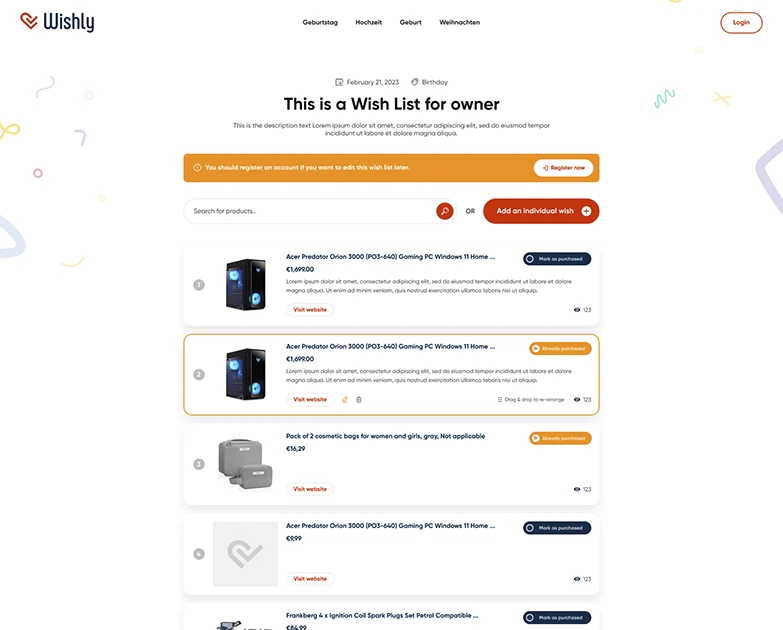
Add wishes to wishlist
Find the gift that is right for you from over 229 million products and put it on your wishlist. You can add as many products as you like to your wishlist.

Share wishlist with family and friends
Share your wishlist easily with your family or friends via email, Whatsapp or a simple link. You can even embed your wishlist into your own website.


Wishlist features from Wishly
No more double gifts
With the "Mark as bought" function, your family or friends can see which wishes have already been fulfilled.
Easily shareable with friends and family
You can easily share your wishlist with friends or family via mail, WhatsApp or a link after you have created it.


7100

19700

2400
What other users say about Wishly
Our Wishly online wishlist has already been used by thousands of users. Learn more about what others think about it.
Frequently asked questions
Is Wishly free?
Yes, Wishly is completely free. Create and share as many wishlists as you like. Wishly is funded through partner links to the shops.
Do I need an account to create a wishlist?
No. You can create your wishlist without signing up and share it right away. An account is still worth having: it keeps your list available even when you switch devices.
How do I share my wishlist?
Every wishlist has its own link. Send it via WhatsApp or email, or copy it directly. Anyone with the link sees the list immediately, no sign-up needed.
How does Wishly prevent duplicate gifts?
Gift-givers mark a wish as purchased and everyone else can see that. You yourself won't see it by default, so the surprise stays intact. You can change that in the list settings.
Which shops can I add wishes from?
Almost any online shop. Paste the product link and Wishly picks up the title, image and price automatically. You can also browse the built-in Amazon product search.
Can I edit my wishlist later?
Yes, at any time. Add, remove or reorder wishes, or change the occasion: everything stays available under the same link you shared.
What is the difference between a wishlist and a gift registry?
A registry is usually tied to one shop or one event. A Wishly wishlist works across shops and for any occasion, from birthdays to weddings.
Which occasions is Wishly good for?
All of them: birthdays, weddings, births, Christmas or your own occasion. Pick the occasion when creating the list and gift-givers see the matching date.