

Create your wishlist online
Simply online, free and without registration.


How it works!3 simple steps to your online wishlist
Create wishlist online for free
Create your wishlist without registration and absolutely free in just a few clicks. Share it with your family or friends. No more boring or duplicate gifts. Gift giving can be so easy.

Add wishes to wishlist
Find the gift that is right for you from over 229 million products and put it on your wishlist. You can add as many products as you like to your wishlist.

Share wishlist with family and friends
Share your wishlist easily with your family or friends via email, Whatsapp or a simple link. You can even embed your wishlist into your own website.



Birthday wishlist
Help your friends and family find the perfect gifts for you.
Wedding registry
Make your special day memorable with a wishlist to share among your guests.

Baby registry
Whether it is a baby shower or first birthday. Create a wishlist for the first special moments.

Christmas wishlist
Christmas time is gift time. Whether for you or your children - create individual wishlists.


7300

20500

2500
Wishlist features from Wishly
No more double gifts
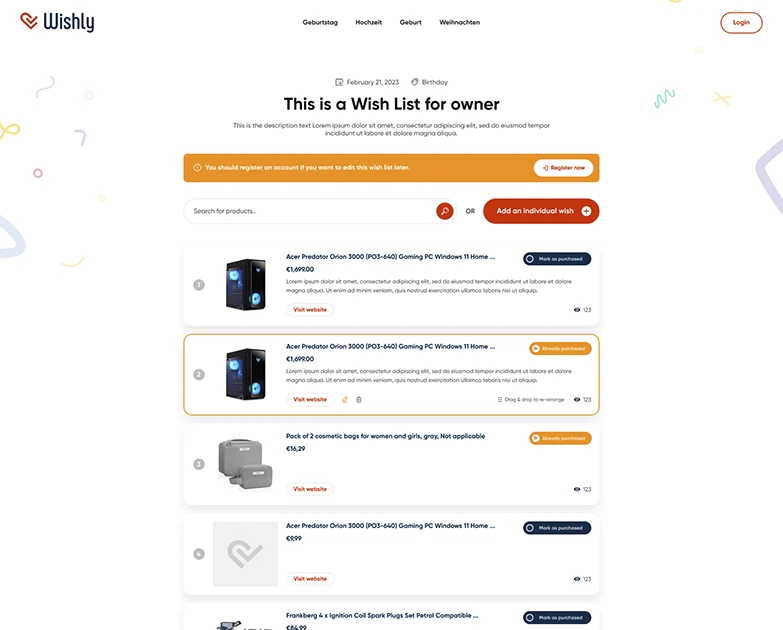
With the "Mark as bought" function, your family or friends can see which wishes have already been fulfilled.
Easily shareable with friends and family
You can easily share your wishlist with friends or family via mail, WhatsApp or a link after you have created it.
What other users say about Wishly
Our Wishly online wishlist has already been used by thousands of users. Learn more about what others think about it.
Frequently asked questions
Is Wishly free?
Yes, Wishly is completely free. Create and share as many wishlists as you like. Wishly is funded through partner links to the shops.
Do I need an account to create a wishlist?
No. You can create your wishlist without signing up and share it right away. An account is still worth having: it keeps your list available even when you switch devices.
How do I share my wishlist?
Every wishlist has its own link. Send it via WhatsApp or email, or copy it directly. Anyone with the link sees the list immediately, no sign-up needed.
How does Wishly prevent duplicate gifts?
Gift-givers mark a wish as purchased and everyone else can see that. You yourself won't see it by default, so the surprise stays intact. You can change that in the list settings.
Which shops can I add wishes from?
Almost any online shop. Paste the product link and Wishly picks up the title, image and price automatically. You can also browse the built-in Amazon product search.
Can I edit my wishlist later?
Yes, at any time. Add, remove or reorder wishes, or change the occasion: everything stays available under the same link you shared.
What is the difference between a wishlist and a gift registry?
A registry is usually tied to one shop or one event. A Wishly wishlist works across shops and for any occasion, from birthdays to weddings.
Which occasions is Wishly good for?
All of them: birthdays, weddings, births, Christmas or your own occasion. Pick the occasion when creating the list and gift-givers see the matching date.
Create an Online Wishlist Easily and for Free
The idea for this online wishlist came from a common problem. Before big events like birthdays or Christmas, your relatives and friends want to know what gifts you'd like. Often, you might not have a ready answer and wish you had a list of all your wishes to share.
Even if you do communicate your wishes to everyone, coordination can be lacking, resulting in duplicate gifts.
The online wishlist from Wishly solves these issues.
With Wishly's online wishlist, you can effortlessly create a birthday wishlist, a wedding wishlist, or a baby wishlist. You can update the wishlist anytime and share it with friends and family.
To prevent receiving duplicate gifts, gift-givers can mark items as "gifted" once they purchase them for you.
Create your own wishlist in just 3 steps, easily and for free.
- Name your wishlist and set the event date.
- Add the products you wish for. Browse through millions of products and select your favorites.
- Share the list with friends and family via email, WhatsApp, or a simple link.
Creating a wishlist is completely free and doesn't require registration.
If you want to edit your wishlist later, you will need to create an account with us.